

Troubleshooting DSQC643 DeviceNet Errors: MAC ID & Baudrate Guide
Troubleshooting DSQC643 DeviceNet Issues: MAC ID Conflicts vs. Baudrate Errors
Decoding the DeviceNet Network Status (NS) LED
In ABB robotic systems, the DSQC643 I/O module is a cornerstone of efficient industrial automation. When the Network Status (NS) LED displays a flashing red light, maintenance technicians often default to assuming a baudrate mismatch. However, industry standards and our experience at PLCDCS HUB indicate otherwise. A flashing red NS light most frequently signals a duplicate MAC ID or a critical network timeout rather than a simple speed configuration error.
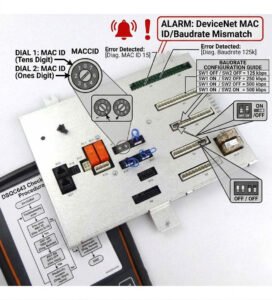
The Impact of Duplicate MAC ID Conflicts
DeviceNet allows node addresses from 0 to 63, but every node must remain unique. When replacing a DSQC643 module, technicians often install the new unit without verifying the rotary switch settings. If the new module inherits a duplicate address, the network immediately rejects the connection. This results in the characteristic red flashing light. We find that over 70% of these field issues stem from incorrect physical address settings on replacement parts.
Analyzing Communication Speed and Network Integrity
While baudrate mismatches do trigger network errors, they are less common in established systems. DeviceNet supports 125, 250, and 500 kbps, depending on total cable length. If your system speed does not match the module configuration, the device will fail to join the network. Moreover, physical layer issues such as missing 121-ohm terminal resistors or excessive electromagnetic interference often mimic configuration errors. Always prioritize verifying your physical network infrastructure before altering software parameters.
Strategic Troubleshooting Workflow
Follow this systematic approach to isolate communication faults in your control systems:
- Verify the hardware MAC ID switches on the DSQC643 module.
- Check the scanner configuration to identify conflicting node addresses.
- Ensure the baudrate matches the existing network design specification.
- Review robot controller diagnostic logs for specific “Bus-Off” or “Timeout” error codes.
- Inspect the physical network for damaged cables or missing termination resistors.
Best Practices for Industrial Maintenance
At PLCDCS HUB, we advocate for proactive documentation to streamline your factory automation maintenance. Before swapping any component, record the existing MAC ID, firmware version, and I/O mapping. This preparation prevents downtime during critical production cycles. If you require genuine replacement hardware or technical documentation, visit PLCDCS HUB for reliable procurement solutions.
Expert Recommendations for Reliability
- ⚙️ Use locking connectors in high-vibration areas to prevent signal loss.
- 🔧 Document every node address in your facility’s master configuration chart.
- ✅ Confirm that cable shields are grounded at a single point to reduce noise.
- ⚙️ Test the network termination resistance using a standard multimeter.
- 🔧 Maintain a list of spare parts with pre-configured settings for faster recovery.
Frequently Asked Questions
Q1: Does a flashing red NS light always mean the DSQC643 module is defective?
No. In most cases, the module itself is functional. A flashing red light is typically a communication diagnostic signal indicating an addressing or network integration issue. Perform a thorough network audit before concluding that the hardware has failed.
Q2: How do I identify if the problem is a cable issue or a configuration error?
Analyze the error logs in your robot controller. If you see “Duplicate Node” errors, it is a configuration issue. If you see “Bus-Off” or intermittent CRC errors, it often points toward physical layer issues like poor shielding, loose terminal blocks, or missing resistors.
Q3: What should I look for when purchasing a replacement DSQC643?
Always ensure the hardware revision and firmware version are compatible with your existing robot controller. Sourcing from reputable suppliers like PLCDCS HUB guarantees that you receive fully tested components that meet your industrial requirements, reducing the risk of integration headaches.


