
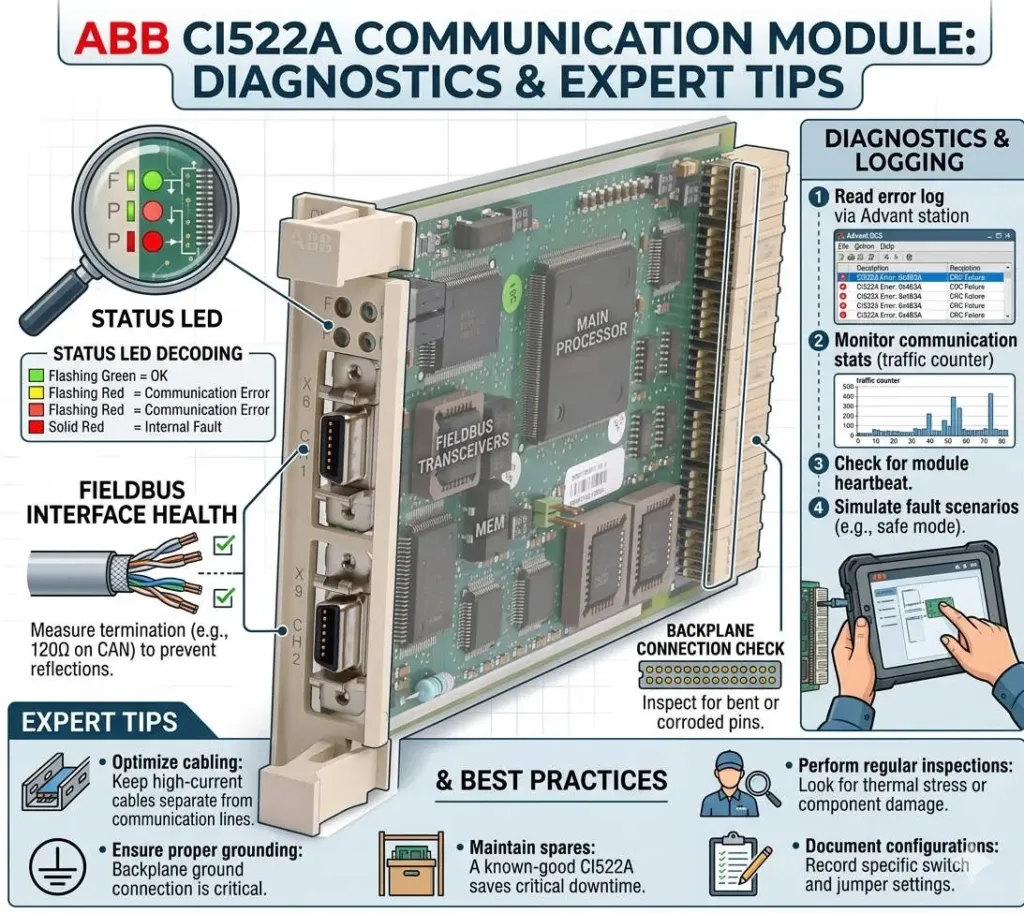
ABB CI522A Communication Module: Diagnostics & Expert Tips
Decoding the ABB CI522A Fault LED: Diagnostics and Solutions
The ABB CI522A communication interface module is a vital component in modern DCS and industrial automation. However, a flashing red “Fault” LED often causes unnecessary alarm during commissioning. Specifically, a repeating pattern of two red flashes usually points to a logical configuration error. Understanding this visual signal helps engineers differentiate between simple setting mismatches and actual hardware failure.
Interpreting the 2x Red Flash Diagnostic Signal
A double red flash typically signifies a configuration or communication initialization fault. This pattern occurs when the module is powered but lacks a proper connection to the controller. Common causes include mismatched fieldbus parameters or node address inconsistencies within the AC 800M environment. Fortunately, this diagnostic code confirms that the module firmware is running correctly despite the lack of cyclic data exchange. Therefore, you should prioritize software verification over hardware replacement.
Expert Commentary from PLCDCS HUB: In our experience, roughly 80% of these “faults” stem from human error during the setup phase. Many technicians assume the module is dead, but it is actually waiting for a valid network handshake. Always check the software configuration first to save significant time and resources.
Technical Insights into Fieldbus Protocol Integrity
The CI522A operates under strict fieldbus timing and addressing rules to ensure deterministic data exchange. Even a minor discrepancy, such as an incorrect GSD file version, will prevent the module from reaching an operational state. Mismatched baud rates or duplicate node IDs also trigger communication timeouts. These failures can lead to process shutdowns in safety-critical factory automation systems. Maintaining protocol consistency is the only way to achieve stable long-term performance.
Essential Installation and Maintenance Protocols
Reliable communication starts with physical hardware discipline and proper environment management. Follow these technical best practices to prevent common startup issues:
- ✅ Node Address Verification: Confirm the DIP switch settings match the project configuration before applying power.
- ✅ GSD File Consistency: Ensure the engineering software uses the exact GSD version required by the hardware.
- ✅ Signal Shielding: Use 360-degree shield grounding in high-noise environments like chemical or power plants.
- ✅ Cable Separation: Keep communication lines away from high-voltage power cables to avoid electromagnetic interference.
Strategic Buyer Considerations for ABB Hardware
When procuring the CI522A for control systems, compatibility remains the primary factor. While this module offers robust performance, it must align with your existing controller firmware. Older versions of Control Builder or outdated AC 800M firmware may not recognize newer module revisions. Consequently, a firmware audit is a necessary step before making a purchase. Always verify system documentation to avoid integration delays during the project execution phase.
Real-World Solutions and Application Scenarios
- Chemical Process Monitoring: Maintains deterministic data links between the control room and remote I/O stations.
- Manufacturing Execution: Bridging third-party devices with ABB systems for a unified production view.
- Commissioning Speed: Utilizing LED diagnostics to identify node conflicts without expensive network analyzers.
If you need reliable components or technical guidance for your ABB infrastructure, explore our extensive inventory at PLCDCS HUB Limited. We specialize in providing high-quality parts that keep your industrial networks running smoothly.
Frequently Asked Questions (FAQ)
1. Does the 2x red flash indicate that my module is permanently damaged?
No, this specific pattern almost always indicates a configuration mismatch. Constant red or no light at all usually suggests hardware failure. If you see two flashes, check your node address and software settings first.
2. How can I resolve a CI522A fault that persists despite correct settings?
Verify the firmware compatibility between the module and your AC 800M controller. Outdated system software often fails to establish a cyclic handshake, even if the physical wiring and addresses are perfect.
3. What is the fastest way to troubleshoot a duplicate node address?
Power down the module and check the physical DIP switches against your network map. In a PROFIBUS network, a duplicate address causes signal collisions that prevent the module from transitioning to an active state.


