
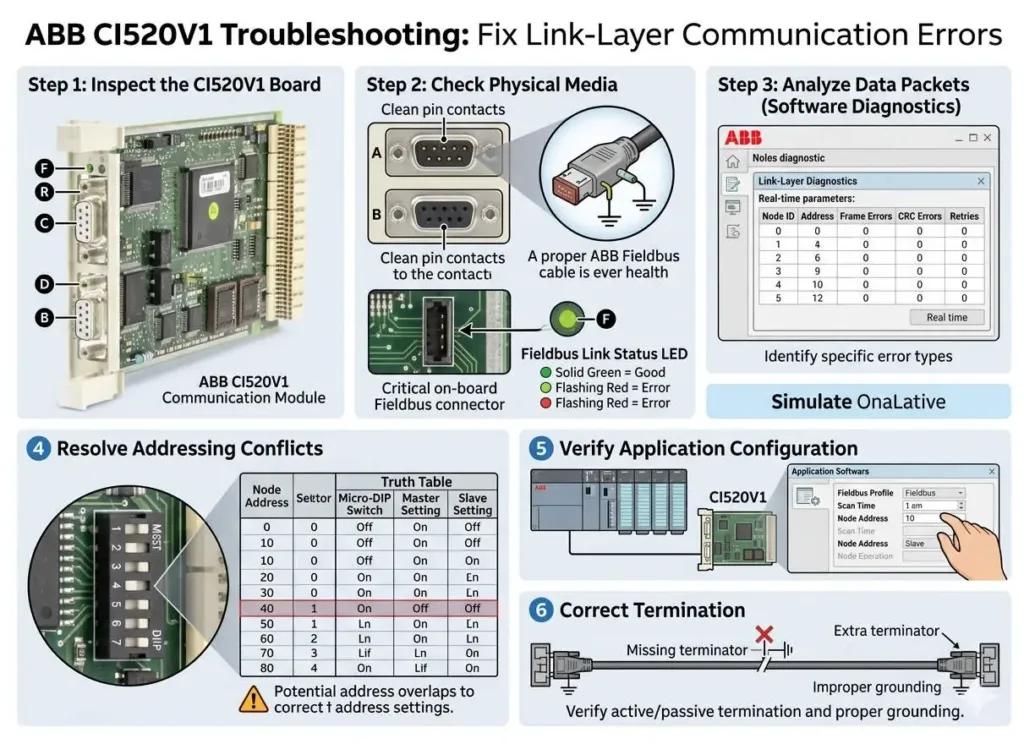
ABB CI520V1 Troubleshooting: Fix Link-Layer Communication Errors
Resolving Link-Layer Errors in ABB CI520V1 Communication Modules
The ABB CI520V1 serves as a vital bridge between controller-level data and expansive field networks. It ensures deterministic and stable data exchange across complex distributed automation systems. In sectors like chemical processing and pharmaceuticals, communication stability is mandatory. Any interruption can halt critical batch processes immediately. Therefore, maintaining link-layer integrity directly protects your facility uptime and final product quality.
Technical Insights into Data Link Integrity
The CI520V1 operates specifically at the data link layer of the network stack. This makes the module highly sensitive to frame errors and timing inconsistencies. Frequent link-layer faults often signal physical degradation, such as impedance mismatches or electromagnetic interference (EMI). In high-speed packaging lines, these errors cause delayed I/O updates. Consequently, the system may trigger false alarms or fail to synchronize critical dosing steps.
Overcoming Protocol Compatibility Challenges
This module must align perfectly with the broader DCS or PLC ecosystem. Protocol mismatches frequently occur during system retrofits or legacy equipment integration. Even if physical wiring looks correct, a configuration gap will trigger persistent link-layer errors. PLCDCS HUB experts often observe this issue when engineers overlook proper protocol mapping. Always verify that your gateways and network structures match the CI520V1 configuration settings.
Mitigating Environmental Noise in Industrial Automation
Petrochemical plants and heavy manufacturing sites generate significant electrical noise. The CI520V1 requires high-quality installation to maintain its noise immunity. Poor shielding or incorrect grounding increases bit error rates significantly. Over time, these invisible electrical stresses reduce system reliability. Therefore, rigorous adherence to industrial automation standards during setup prevents long-term maintenance headaches.
Best Practices for Installation and Maintenance
Field experience suggests that over 60% of communication faults stem from physical layer failures. Use the following technical checklist to ensure a robust connection:
- ✅ Cable Verification: Confirm the use of twisted-pair cables with correct impedance.
- ✅ Termination Resistors: Install resistors at both ends of the bus to prevent signal reflection.
- ✅ Signal Analysis: Use an oscilloscope to visualize signal quality if intermittent errors persist.
- ✅ Grounding Discipline: Ground cable shields at a single point only to prevent ground loops.
- ✅ Physical Separation: Route communication lines away from high-voltage power cables.
Author Perspectives from PLCDCS HUB
At PLCDCS HUB, we believe that link-layer errors are symptoms, not just random faults. Modern factory automation demands a “Physical First” diagnostic approach. Many technicians rush to replace hardware when a loose termination or a nearby VFD is the true culprit. We recommend a structured investigation before investing in new modules. This strategy saves time and reduces unnecessary capital expenditure for your business.
Strategic Buyer’s Guide for ABB Hardware
Determining whether to troubleshoot or replace a module is a common dilemma. If errors persist after verifying all wiring and configuration, hardware degradation is likely. Aging transceivers inside the module eventually lose the ability to drive clear signals. Regarding compatibility, never assume a “plug-and-play” experience with mixed-generation systems. Always check firmware versions against official ABB integration manuals before deployment.
Application Scenarios and Solutions
- Pharmaceutical Batching: Ensures zero-packet loss to maintain strict ingredient dosage records.
- Chemical Process Control: Provides stable links between remote I/O and the central control room.
- High-Speed Packaging: Minimizes latency to prevent synchronization drift on the production line.
Are you looking for reliable automation components? Discover genuine spare parts and expert technical guidance at PLCDCS HUB Limited to keep your operations running smoothly.
Frequently Asked Questions
1. Why does my system show a link-layer error when the module power light is green?
The power LED only indicates internal voltage is present. A link-layer error means the module cannot “talk” to other devices. This usually stems from external noise or a broken data path rather than a total power failure.
2. How can I extend the lifespan of my communication modules in hot environments?
Heat accelerates the aging of internal components. Ensure your control cabinet has adequate ventilation or active cooling. Reducing thermal stress preserves the sensitivity of the signal transceivers over several years.
3. What is the fastest way to test if a CI520V1 is actually defective?
Perform a “bench test” with a short, known-good cable and a single controller. If the module works in a controlled environment but fails in the field, the problem lies in your plant’s wiring or EMI levels.


