Does a Dead Battery on GE IS215UCVDH5AN Erase Programs?
Will a Dead CMOS Battery on the GE IS215UCVDH5AN Cause Loss of Your Control Program?
The GE IS215UCVDH5AN processor board serves as a core computational unit in EX2100 and Mark VI/Mark VIe turbine control systems. When the internal CMOS battery dies, many site engineers panic about potential program erasure. Fortunately, a depleted battery does not delete the primary application logic stored safely in non-volatile flash memory. However, it introduces severe operational risks during cold startups, including corrupted BIOS parameters and real-time clock drift. In critical power generation environments, maintaining this small component prevents catastrophic timing mismatches across redundant processor networks.
Understanding CMOS Battery Functions Versus Non-Volatile Flash Memory Retention
A common field misconception suggests that the lithium battery sustains the entire runtime application program. On the IS215UCVDH5AN board, the control logic remains perfectly safe without battery backup inside non-volatile EEPROM storage. Instead, the battery powers low-level hardware initializations, the real-time clock, and custom BIOS options. Consequently, when the battery voltage collapses completely, the system loses its internal calendar and clock synchronization. This issue creates highly unreliable sequence of events (SOE) logs and triggers immediate hardware diagnostic alarms.
Expert Insight from PLCDCS HUB: A dead battery often remains completely invisible while the controller runs on continuous rack power. However, the true danger surfaces during an emergency shutdown, plant outage, or standard UPS maintenance cycle. At PLCDCS HUB, we advise tracking battery age proactively rather than discovering a failure during a black-start emergency.
Analyzing Voltage Thresholds and Intermittent System Boot Behavior
The industrial-grade 3V lithium cell exhibits predictable degradation patterns over its typical five-to-eight-year operational lifespan. When the output drops below 2.6V, the board enters a critical state where data retention becomes highly unstable. Low voltage frequently causes random BIOS checksum errors and inconsistent CompactFlash card recognition during boot sequences. Unfortunately, maintenance teams regularly misdiagnose these symptoms as catastrophic CPU failures or power supply issues. Regular voltage testing during planned outages eliminates the cost of replacing perfectly healthy hardware modules.
Evaluating Online Battery Replacement Feasibility for Live Panels
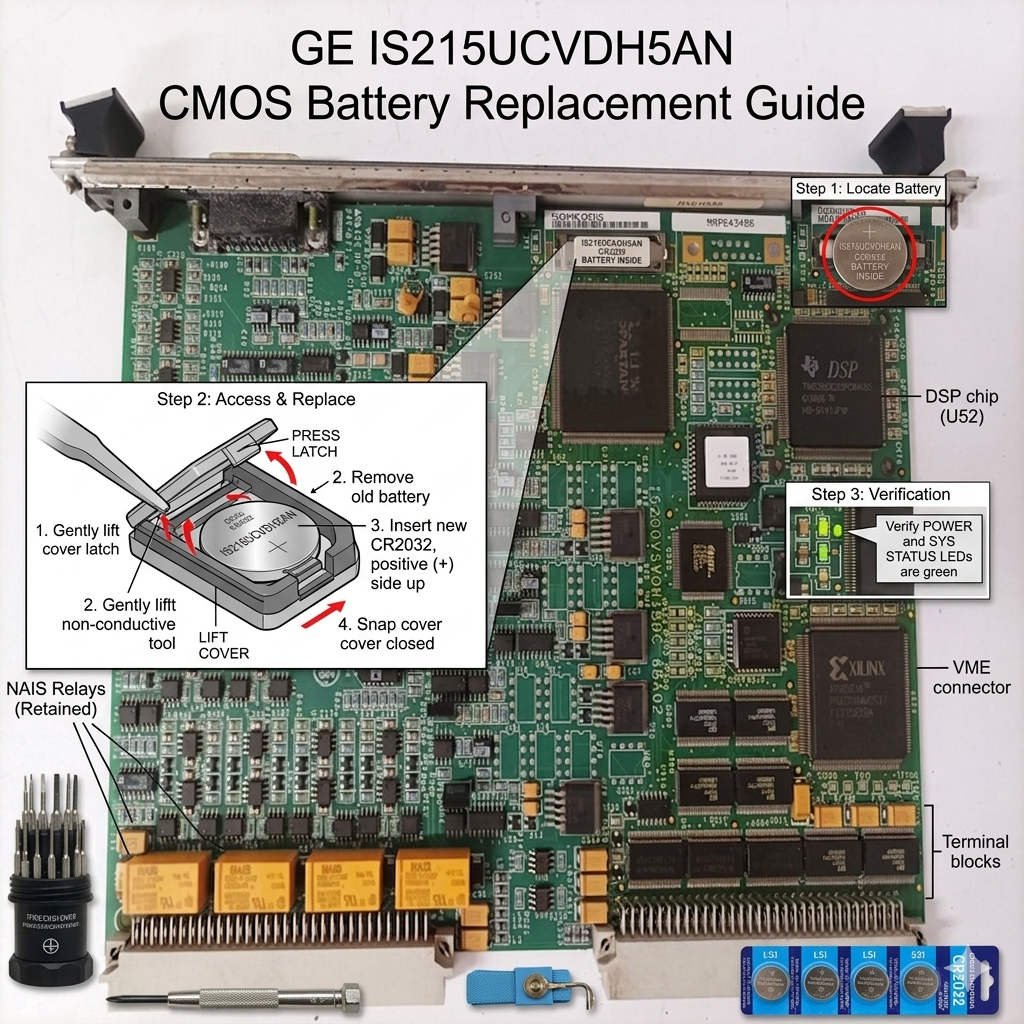
Engineers can safely replace the CMOS battery while the IS215UCVDH5AN remains fully powered inside an active panel. Because the live power rail energizes the CMOS chip, removing the battery briefly will not drop low-level memory. Field experience indicates that technicians must complete the physical swap within 30 seconds to minimize risk. Older boards with degraded capacitors lose their charge holding capability much faster than new assemblies. Therefore, preparing the fresh replacement cell beforehand protects active control systems from accidental default resets.
Field-Proven Online Maintenance Protocols and ESD Precautions
Replacing components on highly sensitive turbine control processors requires absolute compliance with industrial safety standards. Field maintenance personnel should adhere to the following strict guidelines:
- ✅ Redundancy Verification: Confirm that adjacent processors are healthy before performing maintenance on the active rack.
- ✅ Configuration Backup: Save the current ToolboxST application configuration file prior to handling any hardware.
- ✅ Static Protection: Wear a grounded ESD wrist strap to protect nearby FPGA chips from static damage.
- ✅ Non-Conductive Tools: Utilize insulated plastic extraction tools to pop the battery safely from its holder.
- ✅ Polarity Alignment: Insert the new industrial-grade cell immediately while observing the correct positive orientation.
Hardware Compatibility Validation and Strategic Sourcing Guidelines
Never purchase cheap, consumer-grade lithium cells for sensitive factory automation infrastructure panels. Elevated enclosure temperatures cause standard commercial cells to leak or fail within months of deployment. When sourcing a complete replacement board, remember that firmware alignment remains far more critical than simple part number matching. Incompatible baseline code will trigger communication blocks and prevent proper IONet synchronization. Validating compatibility against your existing software database ensures successful integration into your operational PLC layout.
Application Scenarios and Solutions
- Combined-Cycle Power Plants: Prevents incorrect SOE timestamps during major grid disturbances by maintaining clock synchronization.
- Petrochemical Steam Turbines: Eliminates unexpected watchdog startup delays during scheduled plant turnaround sequences.
- Remote Gas Pipeline Stations: Guarantees reliable automatic reboot sequences after unexpected site power outages.
For fully certified GE modules and professional technical diagnostics, visit PLCDCS HUB Limited today. We provide the genuine components and industrial expertise required to secure your industrial automation infrastructure.
Frequently Asked Questions (FAQ)
1. Why does my controller fail to boot even after installing a fresh cell?
If the board lost power while the old battery was dead, the BIOS reverted to factory defaults. You must connect a local engineering terminal to restore the custom boot device path manually.
2. How often should we replace the backup cell on these specific processor series?
We recommend replacing the lithium cell every 3 to 5 years during major plant outages. Harsh environments with ambient temperatures exceeding 45°C accelerate internal self-discharge rates significantly.
3. What should I look for when choosing a replacement module online?
Always verify the exact firmware revision suffix and ensure the board supports your current ToolboxST version. Mismatched firmware versions will prevent redundant processors from tracking each other properly.