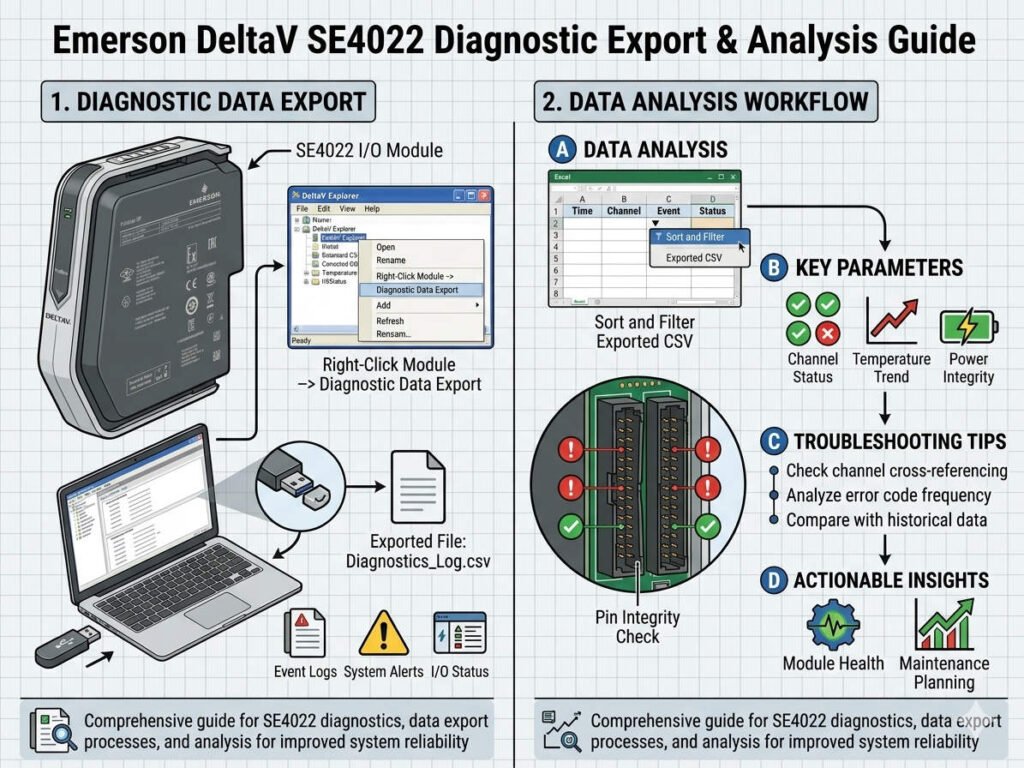
Emerson DeltaV SE4022 Diagnostic Export & Analysis Guide
How to Export and Analyze Emerson DeltaV SE4022 Diagnostic Logs
The Emerson DeltaV SE4022 module serves as a critical interface in modern industrial automation. Its diagnostic log function allows engineers to trace intermittent communication failures and hardware alarms. In refinery and chemical plants, these logs help identify whether faults stem from field wiring or I/O degradation. Furthermore, this capability proves essential during SIS loop validation and startup commissioning. Accessing low-level event records ensures that maintenance teams solve the root cause rather than just clearing symptoms.
Enhancing Troubleshooting with Channel-Level Resolution
The SE4022 records events at the physical channel layer instead of just the controller level. This granular visibility helps isolate open circuits and noise-induced signal fluctuations effectively. In complex DCS environments, this feature significantly reduces the time required for loop checks. For example, logs can reveal hidden retries in a fluctuating 4–20 mA loop that looks stable on graphics. Consequently, engineers can identify shield grounding issues before they lead to complete instrument failure.
Expert Insight from PLCDCS HUB: We often see technicians mistake external interference for hardware failure. Always analyze the channel logs first to differentiate between electromagnetic noise and internal I/O card faults. This approach saves both time and expensive hardware replacement costs for your control systems.
Optimizing Accuracy with Timestamp and Sequence Analysis
Diagnostic exports provide time-sequenced data that aligns with process historian records and plant alarm logs. For pharmaceutical production, accurate sequence-of-events analysis is vital for maintaining GMP compliance. However, engineers must ensure that system clocks remain synchronized across all workstations and controllers. If NTP synchronization drifts, the resulting logs will provide inconsistent data during a root-cause investigation. Therefore, always verify DeltaV time settings before you initiate a data collection task.
Navigating Firmware and Software Compatibility Issues
The behavior of SE4022 diagnostic exports often changes between different DeltaV versions and firmware revisions. Older systems might limit export formats or truncate the historical buffer unexpectedly. In mixed-generation facilities, verify that your workstation has the required administrative privileges for data extraction. Furthermore, excessive diagnostic polling can increase CPU loading on the application station during peak production. We recommend performing detailed exports during scheduled maintenance windows to avoid impacting factory automation performance.
Step-by-Step Technical Guide for Exporting Logs
Follow this standardized procedure to ensure clean data collection for offline analysis:
- ✅ Open Diagnostics: Launch DeltaV Diagnostics from the ProfessionalPLUS workstation.
- ✅ Locate Device: Navigate to the specific SE4022 module within the I/O subsystem.
- ✅ Select Channel: Right-click the affected channel to open the detailed diagnostic view.
- ✅ Export File: Choose the Export Diagnostics option and save it as a .CSV file.
- ✅ Verification: Open the file in a text editor to confirm timestamp integrity.
Strategic Maintenance Tips for Petrochemical Plants
Field experience suggests that many hardware failures actually relate to environmental factors. Before you replace an SE4022 module, inspect the marshalling cabinet bonding and shield grounding. Floating shields frequently introduce intermittent spikes that trigger false channel alarms. Additionally, avoid collecting logs during a controller switchover or redundancy test. These events might overwrite the diagnostic buffer and erase the specific data you need for your investigation.
Strategic Buyer’s Guide for Emerson I/O Modules
Deciding when to replace an SE4022 requires a careful analysis of recurring hardware diagnostics. If faults persist after wiring checks, the module likely requires a professional replacement. However, check for moisture ingress in junction boxes before ordering new parts. Regarding compatibility, verify the DeltaV hardware matrix to ensure the SE4022 supports your existing controller firmware. In brownfield upgrades, partial compatibility may limit advanced event logging features while maintaining basic signal operation.
Application Scenarios and Solutions
- Rotating Equipment Monitoring: Uses high-resolution logs to detect vibration sensor noise.
- Batch Chemical Processing: Provides forensic data to explain signal dropouts during heating cycles.
- Offshore Platform Safety: Ensures SIS loops remain validated through hardware-level tracking.
For authentic Emerson components and expert technical support, visit PLCDCS HUB Limited today. We provide the reliable parts and knowledge your systems need to stay online.
Frequently Asked Questions (FAQ)
1. What should I do if the “Export Diagnostics” button is greyed out?
This usually indicates a user permission issue within DeltaV Security. Ensure your account has the “Configure” or “Maintenance” role assigned. Additionally, some older DeltaV versions require you to be physically logged into the ProfessionalPLUS station.
2. Is it normal to see “Communication Retry” messages in a healthy system?
A few retries are common in high-interference areas, but frequent retries indicate a problem. Check your Ethernet cable quality and ensure signal cables remain separated from high-voltage power lines.
3. How can I ensure my Excel formatting does not ruin the timestamp data?
When importing the CSV file, always set the date/time column to “Text” format. This prevents Excel from applying regional settings that might hide milliseconds or change the 24-hour clock format during your PLC and DCS troubleshooting.