
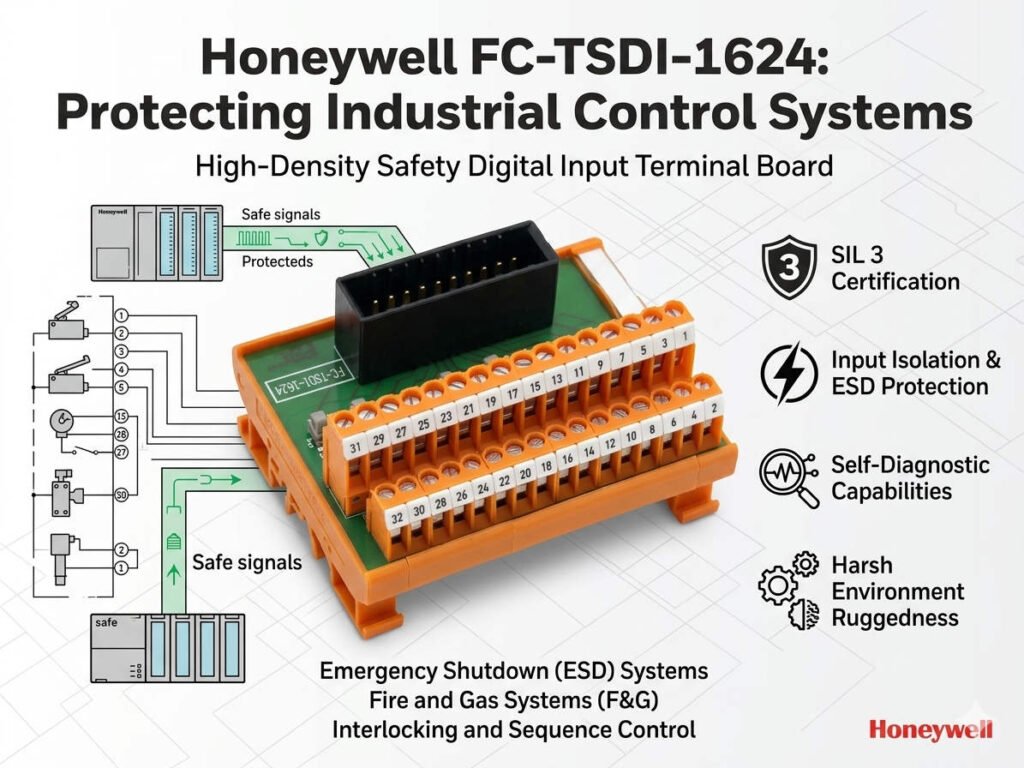
FC-TSDI-1624 Module Guide: Fault Isolation and Troubleshooting
Maximizing System Uptime with the FC-TSDI-1624 Digital Input Module
The FC-TSDI-1624 digital input module features an advanced channel-level protection architecture. This design utilizes field-side fuses to isolate faults without compromising the entire control systems. In sectors like petrochemicals and power generation, this isolation prevents minor wiring shorts from causing total system failure. Therefore, the module maintains high operational availability during localized electrical faults. However, engineers must understand the specific power architecture to troubleshoot these modules effectively.
Technical Insights into Field Power Isolation
The FC-TSDI-1624 separates field-side power from the critical backplane logic power. When a field fuse blows, the module CPU usually remains online and continues communicating with the PLC. However, the signals from the affected input group will drop to a fail state. This separation ensures that an external fault does not crash the main controller. Consequently, the DCS can still monitor the health of the module even during a localized power loss.
Expert Insight from PLCDCS HUB: We often see technicians mistake a blown fuse for a faulty module. Always check the module diagnostic bits first. Proper interpretation of diagnostic data saves hours of unnecessary hardware replacement in factory automation environments.
Optimizing Fuse Rating and Diagnostic Accuracy
Proper fuse sizing is vital for maintaining selectivity within the electrical loop. Correct ratings ensure that only the faulty channel disconnects rather than the upstream power supply. Furthermore, many FC-TSDI-1624 configurations provide specific diagnostic feedback for field power loss. This allows operators to distinguish between a simple signal loss and a genuine electrical protection event. As a result, maintenance teams can reduce the Mean Time To Repair significantly.
Installation Best Practices for Reliable Signal Acquisition
Successful deployment in industrial automation requires more than just hardware mounting. Follow these technical guidelines for the best results:
- ✅ Labeling Discipline: Clearly document all fuse groups and locations during commissioning.
- ✅ Visual Indicators: Use fuse terminals with LEDs to identify blown fuses at a glance.
- ✅ External Surge Protection: Install suppressors in outdoor environments to prevent nuisance trips.
- ✅ Wiring Integrity: Use spring-clamp terminals in high-vibration areas like motor rooms.
Strategic Buyer’s Perspective on Compatibility
When purchasing the FC-TSDI-1624, consider its integration within your existing platform. While it often maintains system-level compatibility, the wiring layout may differ from older legacy modules. Upgrading to this module usually provides better protection than older non-fused designs. Therefore, always verify your terminal assignments before beginning a hardware migration. This prevents unexpected fuse behavior during the initial startup phase.
Application Scenarios and Solutions
- Petrochemical Safety Loops: Protects critical interlock signals from field-side short circuits.
- Power Plant Monitoring: Ensures continuous communication even if a single sensor loop fails.
- Continuous Manufacturing: Minimizes downtime by isolating faults to specific input groups.
For authentic parts and expert technical support on your automation hardware, visit PLCDCS HUB Limited today. We provide the reliable components your industrial automation projects require.
Frequently Asked Questions (FAQ)
1. Will a blown fuse cause my entire PLC rack to go into error mode?
Usually, no. The FC-TSDI-1624 is designed so that the communication remains active. Only the channels linked to that specific fuse will stop reporting data. You will see a “Field Power Failure” alarm rather than a “Module Missing” error.
2. Why do my fuses keep blowing even after I replace the field sensor?
A blown fuse is often a symptom of an underlying issue. Check for intermittent ground faults in the field wiring or moisture in the junction box. Also, ensure your sensors do not have high inrush currents that exceed the fuse rating.
3. Can I use a higher-rated fuse to prevent nuisance tripping?
We strongly advise against this. Using a fuse with a higher rating than specified can allow the fault current to damage the module’s internal circuitry. Always stick to the manufacturer’s recommended breaking capacity to protect your hardware investment.


