
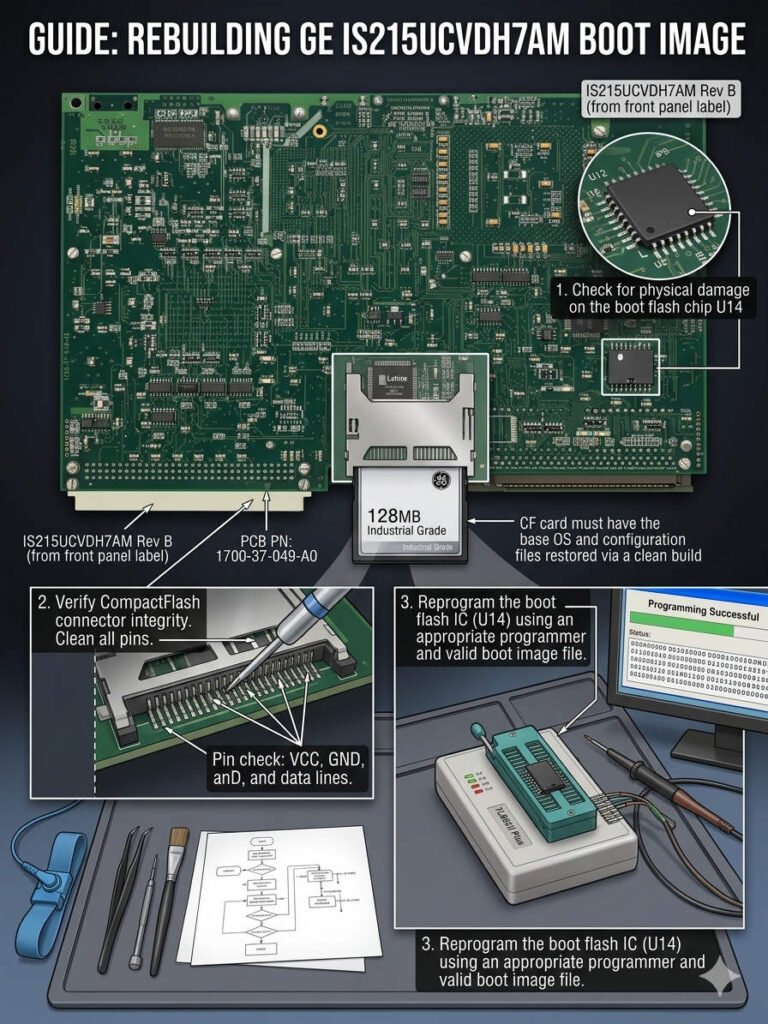
Rebuilding GE IS215UCVDH7AM Boot Image After CF Card Failure
Rebuilding the Boot Image After Storage Failure on GE IS215UCVDH7AM Boards
The GE IS215UCVDH7AM main control board serves as the core processor for EX2100 excitation and Mark VI systems. It relies heavily on PCMCIA or CompactFlash (CF) cards to load its operating environment and runtime configuration files. When this storage media suffers physical damage or file corruption, the entire turbine controller halts unexpectedly. In power plants and petrochemical facilities, a boot failure directly threatens production continuity and automatic voltage regulation. Therefore, rebuilding the boot image quickly becomes an urgent production requirement rather than a standard IT task.
Understanding How Boot Media Architecture Restricts System Recovery
The IS215UCVDH7AM controller stores the QNX or VxWorks kernel, I/O initialization tables, and proprietary firmware on the flash media. Standard industrial PCs permit simple file transfers during software updates or drive replacements. However, GE control platforms require exact partition offsets and master boot record layout structures to execute startup scripts. Standard Windows formatting utilities frequently destroy these proprietary sectors and render the replacement storage card unbootable. Technicians must preserve the exact file system hierarchy to ensure successful processor initialization on these control systems.
Expert Insight from PLCDCS HUB: Many field engineers backup their engineering project files but completely ignore the underlying operating system media. If the CF card dies without a raw image backup, you face an extended outage while sourcing factory software. At PLCDCS HUB, we advise creating bit-stream images of all active boot cards during scheduled maintenance shutdowns.
Selecting Compatible Storage Media for Harsh Factory Automation Environments
Legacy GE control platforms utilize low-capacity storage architectures like 128MB or 256MB cards running on FAT16 file formats. Inserting modern, high-capacity commercial CF cards into older boards often triggers BIOS detection errors or watchdog timeouts. Furthermore, commercial-grade flash memory cannot withstand the elevated ambient temperatures found inside crowded factory automation enclosures. Engineers must specify industrial-grade Single-Level Cell (SLC) storage media to maximize data retention. SLC chips offer superior write endurance and prevent file allocation table corruption during sudden power losses.
Aligning Firmware Revisions to Avoid Network Synchronization Alarms
Rebuilding a corrupted storage device requires perfect alignment between the card firmware and the master controller database. A firmware mismatch between redundant tracking units generates severe IONet communication alarms or application checksum errors. In Triple Modular Redundant (TMR) architectures, version discrepancies can isolate a controller or disrupt voting logic entirely. Therefore, field teams must verify file compatibility with the specific ToolboxST project before deployment. Matching the software baselines ensures smooth data synchronization across the entire distributed control infrastructure.
A Structured Field Guide for Rebuilding Corrupted Boot Images
Restoring a failed IS215UCVDH7AM boot card requires a precise, sector-level reconstruction process rather than simple file cloning. Maintenance teams should execute the following technical sequence:
- ✅ Isolate Power: Shut down the controller power completely before extracting or inserting any flash media card.
- ✅ Source Clean Images: Obtain a verified sector backup from an identical running unit or OEM deployment package.
- ✅ Deploy Industrial Media: Select an SLC-based CF card that matches the original storage capacity and disk mode.
- ✅ Execute Sector Writing: Use bit-stream imaging tools like Win32 Disk Imager to transfer the hidden boot blocks.
- ✅ Verify Diagnostic Status: Power up the board and monitor the serial console for firmware mismatch errors.
Mitigating Physical and Logical Risks via Proactive Maintenance
Turbine environments expose delicate flash storage adapters to continuous mechanical vibration and high-frequency electrical noise lines. Technicians must avoid hot-swapping memory cards while the cabinet backplane remains energized to prevent transient voltage spikes. Moreover, installing heavy-duty retaining clips prevents loose card contacts inside high-vibration generator enclosures. Implementing isolated signal barriers across the 24VDC instrumentation power loop shields the controller board from inductive surges. These proactive measures keep your overarching DCS network stable and secure for long-term production cycles.
Strategic Sourcing and Hardware Replacement Indicators
Knowing when to replace a card instead of formatting it saves critical hours during an emergency turnaround. Physical damage indicators include read errors, excessive heating during operation, or a total failure to detect in BIOS. Logical corruption typically displays filesystem errors, missing runtime directories, or a continuous boot loop sequence. If a card exhibits physical block errors, engineers must discard it and source a certified replacement module. Validating hardware revisions prior to procurement ensures total backward compatibility with legacy PLC setups.
Application Scenarios and Solutions
- Thermal Power Plants: Restores critical turbine startup sequencing after sudden flash memory corruption on main control processors.
- Petrochemical AVR Systems: Eliminates random watchdog resets on excitation boards by upgrading commercial media to industrial SLC cards.
- Continuous Process Lines: Prevents TMR controller isolation events by maintaining identical firmware images across all redundant tracks.
For certified GE components and professional storage restoration services, visit PLCDCS HUB Limited today. We provide the genuine parts and technical expertise needed to secure your industrial automation infrastructure.
Frequently Asked Questions (FAQ)
1. Why can I not copy boot files directly onto a new card using Windows Explorer?
Standard file copying omits the master boot record and hidden partition structures required by the QNX operating system. The board requires a sector-level clone to execute the primary startup sequence correctly.
2. How can I determine if a replacement card supports the mandatory fixed disk mode?
Industrial storage utilities can read the internal firmware parameters of the card. True industrial-grade media comes pre-configured in fixed disk mode to emulate standard IDE hard drives accurately.
3. What steps resolve an IONet communication alarm after deploying a rebuilt image?
This alarm suggests that the network configuration file on the new card does not match the active project. Reload the specific hardware application using your engineering software to overwrite the mismatched network settings.


