

Troubleshooting Bently Nevada 3500/22M Comms Timeout Errors
Troubleshooting Comms Timeout Errors on Bently Nevada 3500/22M TDI
Understanding the 3500/22M Communication Path
Engineers often face “Comms Timeout” errors when connecting to the Bently Nevada 3500/22M Transient Data Interface (TDI). This module acts as the central communication gateway for your entire monitoring rack. When the configuration software fails to establish a link via the front USB or RS232 port, it halts critical diagnostic tasks. At PLCDCS HUB, we frequently see this issue misdiagnosed as hardware failure. In reality, most instances stem from port mismatches or software inconsistencies rather than defective equipment.
Common Interface and Software Conflicts
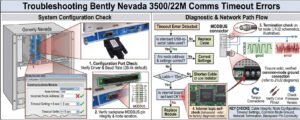
Communication failures often start with incorrect COM port assignments in Windows. Windows updates frequently shift these assignments, rendering your previous software settings obsolete. Furthermore, ensure your configuration software version aligns perfectly with the TDI firmware. Mismatched versions often lead to successful port detection but failed data exchange. We recommend maintaining a strict compatibility matrix to avoid these common bottlenecks in your factory automation environment.
Field-Proven Diagnostic Best Practices
Before you consider replacing your TDI module, follow our expert troubleshooting workflow. These steps resolve the vast majority of connectivity problems in industrial automation systems:
- ⚙️ Verify the assigned COM port number in Windows Device Manager.
- ⚙️ Ensure the software configuration matches your active COM port setting.
- ⚙️ Use only high-quality, industrial-grade USB-to-RS232 adapters for stability.
- ⚙️ Confirm that the TDI module is seated firmly in the rack.
- ⚙️ Check the system for electromagnetic interference or poor grounding.
Author Insights: Reliability in Critical Monitoring
In our experience at PLCDCS HUB, environment plays a massive role in communication reliability. Vibration monitoring systems in oil and gas or power generation facilities demand clean power and robust shielding. If you experience random disconnects, inspect the power supply health indicators first. High-frequency electrical noise often mimics a “Comms Timeout” by corrupting serial data packets. Prioritizing signal integrity will significantly extend the lifespan of your control systems.
Practical Solution Scenario
A client recently reported constant timeouts on a new 3500 rack. We identified that a consumer-grade USB adapter caused timing errors, leading to packet loss. Replacing it with an industrial-rated converter resolved the connection instantly. This saved the site from an unnecessary and costly module replacement. If you require expert support or high-quality components for your monitoring systems, please visit PLCDCS HUB for professional assistance.
Frequently Asked Questions
Is a “Comms Timeout” a definite sign that my TDI module is broken?
No, this error is rarely a hardware failure. It usually indicates a driver issue, a bad cable, or a software configuration mismatch.
What should I look for when buying a USB-to-RS232 adapter?
Always choose adapters with industrial chipsets and built-in surge protection. Cheap, off-the-shelf consumer adapters often fail to handle the timing requirements of industrial monitoring software.
How can I prevent communication issues during system commissioning?
Establish a standardized communication protocol for all technicians. Document the specific driver versions and adapter models that prove stable during initial site testing.


