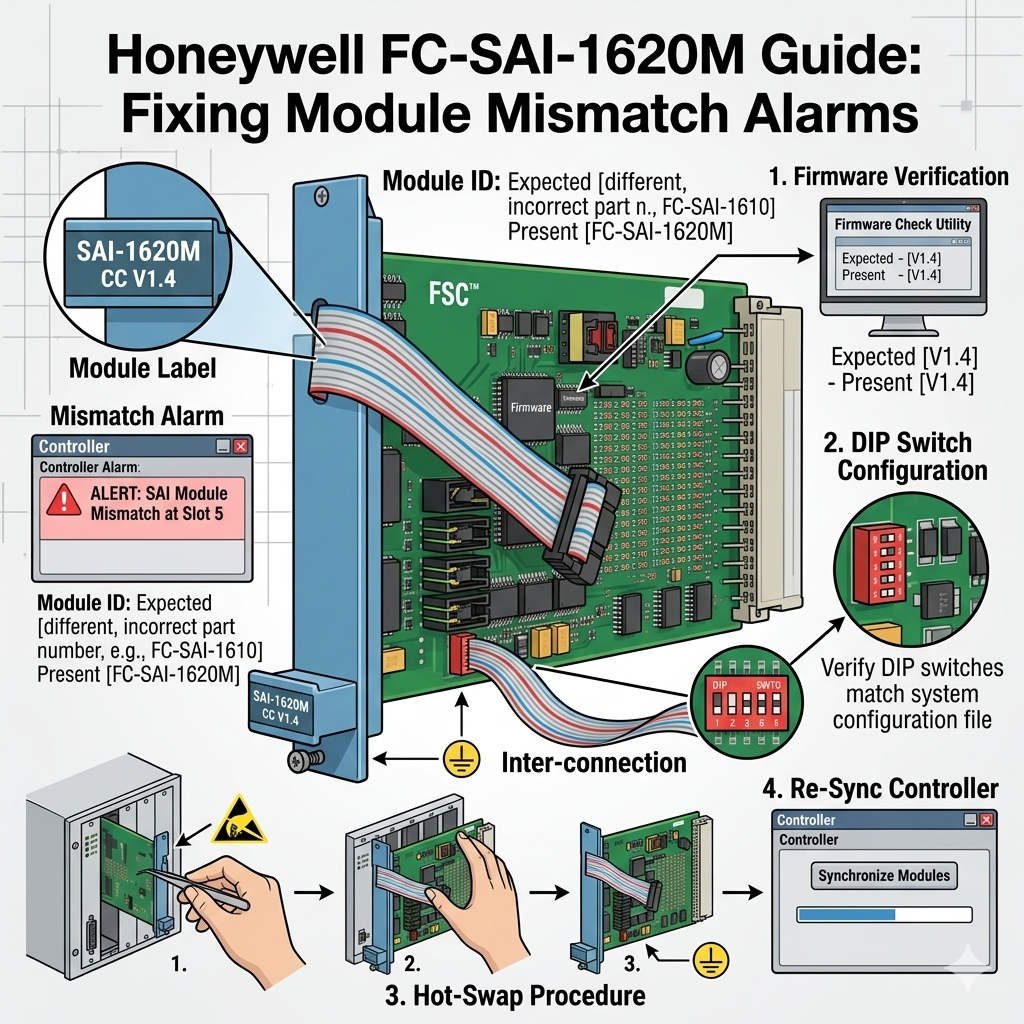
Honeywell FC-SAI-1620M Guide: Fixing Module Mismatch Alarms
Resolving Honeywell FC-SAI-1620M Module Mismatch Alarms
The Honeywell FC-SAI-1620M ensures high-integrity analog signal acquisition within safety-critical control systems. When a “Module Mismatch” alarm occurs, it indicates an inconsistency between the controller database and the physical hardware. This mechanism prevents the system from operating under unverified conditions. In industries like refining and pharmaceuticals, this safeguard maintains functional safety and protects against incorrect I/O mapping. Furthermore, it ensures that only compatible components manage your critical process loops.

Technical Insights into Firmware and Revision Alignment
The FC-SAI-1620M operates within the Honeywell Safety Manager architecture. Each module revision must strictly match the Safety Builder configuration. A discrepancy between the configured type and the physical module causes an immediate rejection by the controller. As a result, the system blocks operation to prevent potential signal errors. Moreover, engineers often encounter this issue when replacing modules during urgent maintenance without updating the project file.
Expert Insight from PLCDCS HUB: In our experience, firmware version control is the most overlooked aspect of industrial automation. We recommend maintaining a digital log of all module revisions to streamline emergency replacements and avoid commissioning delays.
Ensuring Channel Configuration and Slot Integrity
Each channel on the FC-SAI-1620M supports specific signal types, including 4–20 mA and HART protocols. If the controller expects a configuration different from what the module reports, a mismatch flag triggers. This prevents false readings that could lead to unnecessary plant trips or hazardous failures. Additionally, the Safety Manager assigns logical addresses to every slot. Installing a module in the wrong position will immediately violate the system’s addressing integrity.
Practical Installation and Maintenance Protocols
Adhering to disciplined maintenance workflows eliminates most configuration errors. Technicians should follow these technical steps:
- ✅ Perform Module Discovery: Run a hardware scan in Safety Builder after every installation.
- ✅ Check Firmware Labels: Compare the physical module label with the software project version.
- ✅ Validate Slot Labels: Use physical tags to ensure modules match their assigned logical addresses.
- ✅ Secure Connections: Fully seat modules in high-vibration environments like offshore platforms.
Strategic Buyer’s Perspective on Safety Modules
Procuring the right hardware revision is essential for factory automation stability. The FC-SAI-1620M is generally backward compatible within its product family. However, older projects may require software updates to recognize newer “M” series revisions. Therefore, you should always consult official release notes before purchasing replacements. Treating the mismatch alarm as a safety barrier rather than a fault ensures long-term system reliability.
Application Scenarios and Industry Solutions
- Petrochemical Safety Loops: Prevents signal interpretation errors in high-pressure reactor monitoring.
- Refining ESD Systems: Ensures emergency shutdown logic relies on validated hardware configurations.
- Pharmaceutical Processing: Maintains strict I/O mapping for precise batch control and safety compliance.
For authentic Honeywell parts and professional technical guidance, visit PLCDCS HUB Limited today. We provide the reliable PLC and DCS components your facility requires.
Frequently Asked Questions (FAQ)
1. Can I force a download to clear a mismatch alarm?
No, forcing a download is dangerous in safety systems. It can lead to latent faults where the controller misinterprets field signals. You must resolve the underlying hardware or configuration discrepancy to clear the alarm safely.
2. How do I identify the exact revision needed for my Safety Builder project?
Open your project in Safety Builder and check the “Module Definition” properties. We recommend taking a photo of the original module’s side label. This ensures you purchase a revision that matches your current firmware environment.
3. Is a “Module Mismatch” always caused by incorrect hardware?
Not always. In many cases, the module is functional, but the backplane addressing is incorrect. Verify that the module is fully inserted into the correct slot before assuming the hardware itself is the wrong version.