
How PLC Memory Impact System Real-Time Control Accuracy
Does PLC Memory Size Actually Define Your Automation Speed?
In the world of industrial automation, a common misconception exists regarding PLC memory. Many engineers assume more memory equals faster processing. However, memory size primarily dictates system stability and scalability rather than raw calculation speed. At PLCDCS HUB, we believe understanding this distinction is vital for maintaining high-performance control systems.
The Relationship Between Program Memory and Scan Time
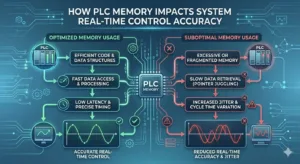
Program memory stores the essential logic your CPU executes every cycle. While the processor handles the “thinking,” memory provides the necessary workspace. If memory usage exceeds 80%, the PLC may struggle with internal management tasks. This overhead often causes scan time fluctuations, leading to inconsistent outputs in high-speed packaging or motion control.
- ✅ Keep program logic usage below 70% for peak stability.
- ✅ Monitor scan time jitter during high-load communication tasks.
- ✅ Avoid complex nested loops that strain memory resources.
- ✅ Ensure firmware versions are compatible with your logic size.
Data Registers and Communication Throughput
Data memory acts as a buffer for real-time I/O and SCADA communication. Insufficient data memory often leads to buffer overflows during heavy network traffic. For instance, protocols like Modbus TCP or Profinet require dedicated memory blocks to maintain steady data flow. Consequently, undersized memory can cause intermittent data loss in critical petrochemical or pharmaceutical processes.
Strategic Memory Allocation for Modern Industry
Modern factory automation relies on multi-protocol integration and IIoT connectivity. Each active connection to an MES or cloud gateway consumes a portion of available memory. Therefore, selecting a PLC with overhead is an investment in future-proofing. At PLCDCS HUB Limited, we frequently see systems fail during expansion because the original design ignored communication memory needs.
Engineering Insights: Lessons from the Field
During a recent pharmaceutical line upgrade, we observed significant timing errors. The issue stemmed from local data logging that saturated the PLC’s internal registers. By offloading historical data to an external SCADA system, the scan time stabilized instantly. This experience highlights that memory management is just as important as hardware selection.
Implementation Best Practices for Stability
To ensure long-term reliability, engineers should follow strict allocation guidelines during the commissioning phase. Always leave at least 30% headroom for future logic expansion or mandatory firmware updates. Furthermore, utilize circular buffers for local alarms to prevent memory fragmentation over years of continuous operation.
- 🔧 Validate memory usage after every major logic change.
- 🔧 Use external historians for long-term data storage needs.
- 🔧 Audit communication loads to prevent packet drops.
- 🔧 Follow IEC 61131-3 standards for structured, efficient programming.
Solution Scenario: Petrochemical Expansion
In a large-scale DCS integration, a facility added twenty new vibration sensors to a turbine. The existing PLC hardware lacked the memory to buffer the increased high-frequency data. By upgrading to a high-capacity module from PLCDCS HUB, the plant maintained deterministic control without replacing the entire CPU architecture.
Looking for reliable PLC and DCS hardware to stabilize your production? Explore our extensive inventory of high-end automation components at PLCDCS HUB Limited today.
Frequently Asked Questions (FAQ)
Q1: Does a larger memory card improve my PLC’s logic execution time?
No, the CPU clock speed determines execution. However, sufficient memory prevents “stuttering” caused by memory management tasks and full communication buffers.
Q2: When should I choose a high-memory model over a standard version?
Select high-memory models if your project involves extensive data logging, complex PID loops, or multiple third-party communication protocols like OPC UA.
Q3: How can I verify if my current PLC is reaching its memory limits?
Check the diagnostic buffer in your programming software. If you see “Memory Full” warnings or irregular scan cycles, it is time for a hardware upgrade.
Related Posts